 Quick Answer: Google reviews help local SEO in two ways: they feed “prominence,” one of Google’s three local ranking factors, and they decide who gets the click once searchers see the map. The way to get more Google reviews is simple but not easy: ask every customer (not just the happy ones), ask soon after the job or session, make it one tap with your Google review link or QR code, never offer an incentive, and keep a steady monthly pace instead of one big push. Reply to every review, good and bad, within a day or two. Google’s review policy is stricter than the FTC’s in several places, so follow Google’s rules for Google reviews.
What’s covered in this post:
- Do Google reviews help SEO? What Google, experts, and customers say
- Google’s review policy: what’s allowed and what gets you restricted
- How to ask for Google reviews without being pushy (with templates)
- How to respond to Google reviews, good and bad
- Review velocity: why one big batch isn’t enough
- What to do about fake, unfair, or extortion reviews
- Tools that automate review requests
Picture this. Someone in Glenwood Springs grabs their phone and types “roofer near me” or “massage therapist near me.” Three businesses pop up in the map. Before they ever open a website, they glance at the stars and the review counts, and they tap the one with more recent, better-rated reviews. That moment plays out thousands of times a day across Colorado, and it’s exactly why learning how to get more Google reviews is one of the highest-return moves a local business can make.
Reviews do double duty. They help decide who shows up in that map in the first place (ranking), and who gets the tap once they’re there (conversion). Reviews are one of the five parts of the local SEO framework I use with every client, and they’re the part where I see the most room to grow.
Here’s what we’re covering: what Google actually allows (the rules have tightened, and a lot of common advice now breaks them), how to ask without being pushy, how to reply to good and bad reviews, why a steady pace beats one big push, and what to do about fake or unfair reviews.

Do Google Reviews Help SEO? Yes, in Two Ways
What Google itself says
So, do Google reviews help SEO? Yes, and you don’t have to take my word for it. Google names three main factors for local ranking: relevance, distance, and prominence. In its own help documentation, Google says prominence “is also based on info like how many websites link to your business and how many reviews you have,” and that “more reviews and positive ratings can help your business’s local ranking.”
Google is just as clear that there’s no shortcut: “There’s no way to request or pay for a better local ranking on Google.” Reviews live on your Google Business Profile, and they’re one of the few prominence signals you can actively build, week after week.
What local SEO experts rank highest
Google doesn’t publish a weighted formula, so the best outside view comes from Whitespark’s 2026 Local Search Ranking Factors survey, which asked 47 local SEO experts to score 187 factors. This is expert consensus, not Google confirmation, but it’s the most respected study in our field. For local pack and Maps rankings, review signals placed high:
- High numerical Google ratings (4 to 5 stars): #6
- Quantity of native Google reviews with text: #9
- Recency of reviews: #11
- Sustained influx of reviews over time, rather than bursts: #14
Whitespark also reports that review signals increased in importance for 2026. One more ranking worth noticing: “Presence of owner responses to most reviews” lands way down at #122 for local pack ranking, but jumps to #17 for conversion. Translation: replying to reviews won’t move you up the map much, but it will help you win the customer once they find you. More on that below.
What customers do with reviews
BrightLocal’s Local Consumer Review Survey 2026 (1,002 U.S. adults, published February 2026) is the clearest picture of how people actually use reviews:
- 97% of consumers read reviews for local businesses, and 41% “always” read them when browsing, up from 29%.
- 68% will only use a business with four or more stars, up from 55% in 2025. 31% now require 4.5 stars or higher, up from 17%.
- 47% won’t use a business with fewer than 20 reviews.
- 85% say positive reviews make them more likely to use a business, and 77% say negative reviews make them less likely.
One shift worth watching: Google is still the top place people read reviews at 71%, but that’s down from 83%, while AI tools jumped from 6% to 45% as a source of local recommendations. Where people look for recommendations is spreading out, which is one more reason your reputation has to hold up everywhere, not just on one listing.
What a star rating does to clicks
The best-known click data is older, so I’ll flag it up front: in a 2016 BrightLocal test using mock search results pages and 6,283 panelists, local-pack listings with 5 stars drew 69% of clicks, 4 stars drew 59%, and 3 stars drew 44%. The exact numbers are a decade old, but the direction matches everything in the 2026 survey above. If you want the bigger picture on why those three map spots carry so much weight, I walk through it in the Google Map 3-Pack explained.
Birdeye’s State of Google Business Profile 2026 report puts a number on a single review: one additional review averaged 600+ search impressions, 80+ website visits, 63+ direction requests, and 16+ calls. Two honest caveats. That data comes from large multi-location brands, and Birdeye sells review software. Birdeye itself says the figures “should not be interpreted as guaranteed results.” Treat it as directional, not a promise.
When I audit a profile, the most common review problem I see isn’t a bad rating. It’s a decent pile of reviews from two or three years ago and almost nothing since. To a searcher, that reads like a business that’s slowed down, or worse, closed.
Google’s Review Policy: What’s Allowed and What Gets You Restricted
This is the section most review guides skip, and it’s the one that can actually hurt you. The Google review policy has tightened, and plenty of advice still floating around online (review kiosks, staff quotas, “mention our name in your review”) now breaks it. Here’s the current line, straight from Google’s Prohibited & Restricted Content policy.
| Allowed by Google | Not allowed by Google |
|---|---|
| Asking customers to review you, as long as the review reflects a genuine experience and you don’t offer an incentive or try to influence the rating or content. | Offering incentives “such as payment, discounts, free goods and/or services” for a review, or for revising or removing a negative one. |
| Sharing your Google review link or QR code. | Review gating: discouraging negative reviews or “selectively solicit[ing] positive reviews.” |
| Replying to reviews, positive and negative. | Requiring or pressuring customers to review while on the premises, or requesting that specific content be included. |
| Displaying a printed QR code where customers can see it. | Staff review quotas, or asking customers to mention a staff member by name. |
| Asking every customer, on a steady, ongoing basis. | Conflict-of-interest reviews, including “current or former employment” and “familial relationships.” |
| Inviting customers to share what stood out, in their own words. | Posting reviews from multiple accounts, or reviewing a competitor to hurt them. |
One more that trips people up: don’t ask customers to mention keywords or specific services. Some SEO advice still recommends it, but Google prohibits merchants from requesting “that specific content be included.” The safe version is simply inviting customers to share what stood out about their experience, in their own words.
What happens if Google catches a violation
Google’s documented penalties: it can block new reviews on your profile for a set period, unpublish your existing reviews, and display a public warning on your profile that fake reviews were removed. That last one is the real damage. A warning banner hurts trust far more than a handful of 3-star reviews ever could.
And Google is enforcing at scale. In 2025 it blocked or removed over 292 million policy-violating reviews, restricted posting for more than 782,000 accounts, and removed over 13 million fake Business Profiles. Its transparency report counts 221 million reviews removed specifically for fake engagement.
The federal layer: the FTC
The FTC’s Consumer Reviews and Testimonials Rule took effect October 21, 2024, and courts can impose civil penalties for knowing violations. It bans buying or selling fake reviews (AI-generated ones included), incentives conditioned on a positive or negative review, undisclosed reviews from insiders, and suppressing reviews through groundless legal threats, intimidation, or false accusations.
Here’s the nuance that matters. The FTC rule allows sentiment-neutral incentives as long as they’re disclosed. Google doesn’t allow any incentive for Google reviews, period. When the two disagree, follow Google’s stricter rule for your Google reviews. Same story on review gating: the FTC says asking only happy customers “could violate the FTC Act,” while Google prohibits it outright.
A quick note on Yelp
Yelp goes further than both: it asks businesses not to ask for reviews at all, and says solicited reviews may not be recommended. Focus your active requests on Google.
How to Ask for Google Reviews Without Being Pushy
Now the good part. Once you know the rules, how to get more Google reviews comes down to one habit done consistently: asking.
Ask everyone, not just your happiest clients
Ask every customer. It’s the policy-safe approach, and honestly, it’s the more grounded one. Cherry-picking your happiest clients is review gating, and as covered above, Google prohibits it.
The encouraging part: BrightLocal’s 2026 survey found 78% of consumers were asked to leave feedback in the past year, and 65% wrote a review after being asked. 28% say they’ll “always” write one when asked, up from 16%. Most people say yes. The main barrier isn’t reluctance. It’s that nobody asked.
Timing the ask
In my experience, the best time to ask is soon after the job or session, while the experience is still fresh and the good feeling is still in the room. In my business, there are some reviews that can’t be written until we see results, like Google Map 3-pack results.
Umbrella Roofing is one of my case studies. I did a bunch of work for this client, so there are many things this customer could review within a few days of Part 1 completion. Once we start getting Google Map pack visibility, I may then request a 2nd review from another one of the owners.
For most of my clients, that means a short, personal text or email within a day of finishing the work, sent by the owner rather than a faceless system.
Recency matters to customers too: BrightLocal found 74% look for reviews from the last three months.
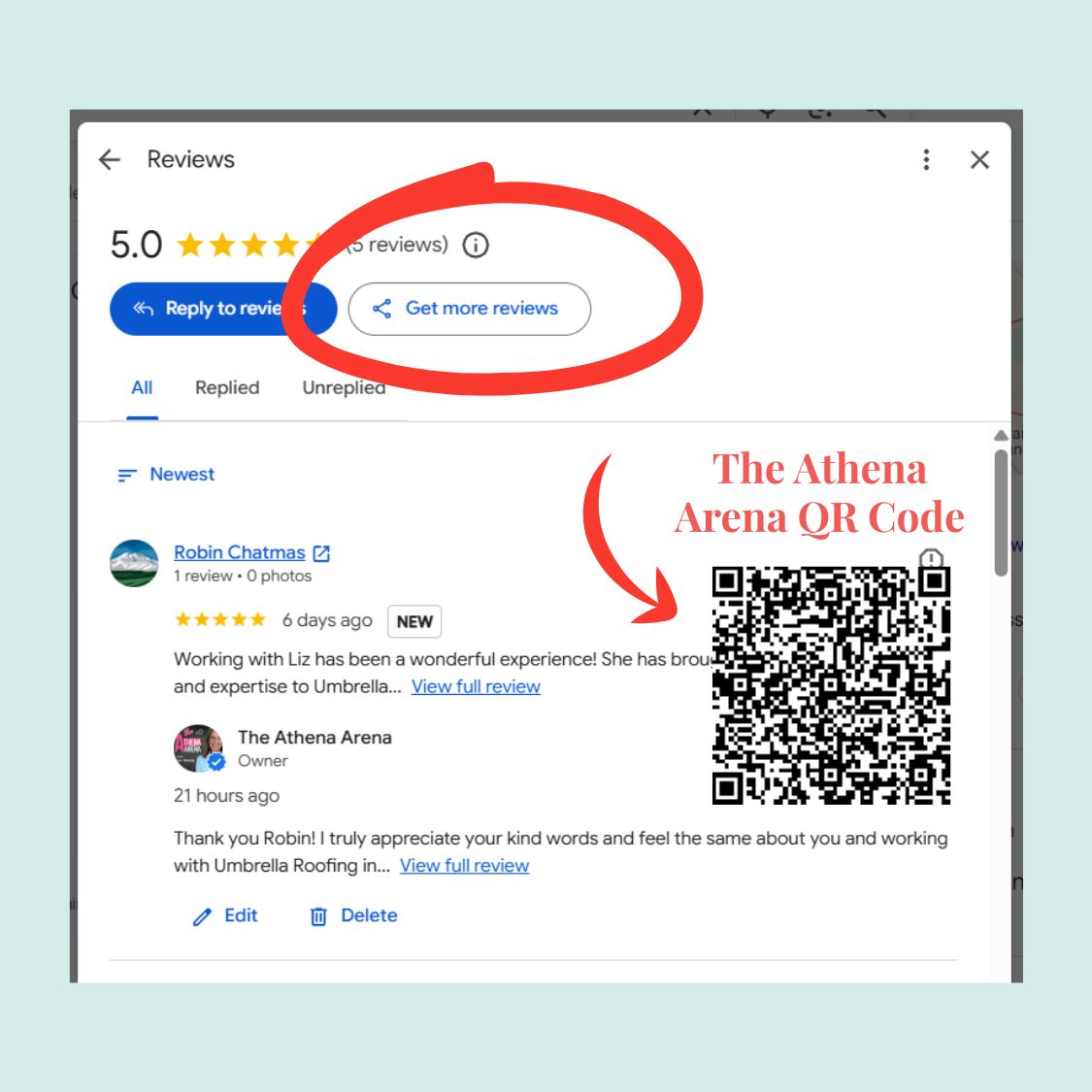
How to get your Google review link and QR code
Your Google review link is the shortest path between a happy customer and a posted review. Google’s own steps:
-
The Athena Arena Google Reviews Request QR Code
Open your Business Profile.
- Select “Read reviews.”
- Copy the review link, or save the Google review QR code image.
Heads up: right now you can only generate the QR code from a computer browser, not on mobile. Google suggests putting the link or QR code on receipts, in thank-you emails, at the end of a chat, and on a printed QR code displayed in your shop or office. You can also send requests by email, WhatsApp, or a Facebook post.
One policy caveat: a QR code on the counter is fine. Handing a customer your shop tablet and standing there while they type is not. Google prohibits pressuring customers to review on the premises.
Simple request templates for how to ask for Google reviews
Copy these, adapt them to your voice, and keep them sentiment-neutral.
Text message:
Hi [Name], thanks for choosing [Business]. If you have a minute, we’d appreciate an honest review on Google: [link]. It helps neighbors find us.
Email:
Subject: A quick favor?
Hi [Name], thank you for trusting us with [project/session]. If you have a minute, we’d appreciate an honest review on Google. Feel free to share what stood out about your experience: [link]. It helps neighbors find us.
Thank you, [Your name]
In person, at the end of a job or session:
“If you have a minute this week, an honest Google review would mean a lot. This card has the link.” (Hand them a printed card with your QR code, then let it go.)
What to leave out: “5-star,” “positive,” “mention [service or staff name],” or anything like “tell us how much you loved…” The FTC flags that kind of wording as implying a required sentiment, and Google prohibits requesting specific content.
For practitioners who feel awkward asking
Energy workers, coaches, bodyworkers, and therapists tell me this all the time: asking for a review feels like bragging, or like it pulls the energy out of a meaningful session. I get it. Here’s the reframe. A review isn’t about you. It’s how the next person who needs exactly what you offer finds you. Asking is normal, and as the data above shows, most people say yes when you ask. You’re not selling. You’re putting a stake in the ground for the work you do.

How to Respond to Google Reviews, Good and Bad
Why replies matter
Knowing how to respond to Google reviews matters more than most owners think. BrightLocal’s 2026 survey found 89% of consumers expect owners to respond. 80% are likely to use a business that responds to all of its reviews, compared with 45% for one that replies only to positive reviews and 47% for one that replies only to negative ones. And 42% are unlikely to use a business that never replies.
Speed expectations are rising, too: 32% want a response by the next day (up from 18%), and 81% expect one within a week. One more number to tape to your monitor: generic or templated replies put off 50% of consumers. That’s the main reason to personalize every single one.
How replies work on Google
You need a verified profile to respond to Google reviews. Google checks replies against its policies; most post within about 10 minutes, but some can take up to 30 days. Replies show as coming from your business, not your personal name.
The reviewer gets notified when you reply and can update their review afterward. That’s why a calm, genuine reply to a negative review sometimes turns into a revised review.
Responding to positive reviews
Quick, specific, and human. Thank them by first name, mention one real detail, and close warmly.
Thanks so much, Sarah! We loved working on your Carbondale kitchen remodel, and that morning light over Mount Sopris through the new window is a real bonus. Enjoy it, and we’re here whenever you need us.
There’s a bonus here, too. When I talk about optimizing your profile, detailed owner replies are part of it. They add real, useful information to your profile, and now that Google has retired Business Profile Q&A, that’s the kind of content Google’s AI answers in Maps can draw on.
How to respond to negative reviews professionally
Here’s the four-step framework I give every client for how to respond to negative reviews:
- Acknowledge. Thank them for the feedback and name the issue without getting defensive.
- Take responsibility where appropriate. Don’t argue the details in public. Future customers are reading your tone, not refereeing the facts.
- Take it offline. Offer a direct phone number or email.
- Close on a commitment. Tell them what you’ll do next.
Hi Mark, thank you for taking the time to share this. I’m sorry the scheduling on your project fell short of what you expected. That’s not the experience we want anyone to have. I’d like to understand what happened and make it right. Please call me directly at [phone] or email [email].[Name], Owner
A legal guardrail worth knowing: the FTC rule bans groundless legal threats, intimidation, and knowingly false accusations used to get a review removed. Contacting the customer to resolve the issue is allowed.
If you’re a licensed health or wellness provider, read this before you reply
HIPAA applies to health care providers (such as psychologists, chiropractors, and clinics) that transmit health information electronically in standard transactions, which typically means insurance billing.
Federal regulators have fined providers for revealing patient information in review replies. A California dental practice paid $23,000, and a New Jersey psychiatric practice paid $30,000 after disclosing a patient’s information in a reply to a negative review.
Safe practice: never confirm the person was a client, and never mention their care. Thank them, state your general commitment, and invite them to contact you directly.
Many coaches and energy workers aren’t covered by HIPAA. I still recommend following the same confidentiality standard. It’s not a legal requirement for you, but it’s the right one for the trust your work depends on.
Should you use AI to write replies?
Google has been testing a “Reply to reviews with AI” draft feature in some accounts since spring 2026. The rollout is limited, so treat it as a test, not a standard feature.
I use AI every day to run my business, so this isn’t an anti-AI take. But for review replies, use AI drafts as a starting point at most (I just tested this.). Half of consumers are turned off by templated replies, and an AI draft with nothing personal added is exactly that. Always add a real detail only you would know.
I didn’t realize that my Local SEO tool auto-responded to a Google Review. The upside is that it responded right away, the modest downside is that this particular AI response was not in my voice and was a bit over-inflated for my taste.
Luckily, I received notification that a review was submitted so i could go and respond to it immediately. (That’s where I saw the AI response.) I edited the AI response in my own words and spoke directly to the reviewer, my main contact at the company.
I am going to leave my AI auto-responder on for now, because it does get a fire under me to take care of the response right away.

Review Velocity and Recency: Why One Big Batch Isn’t Enough
The ranking side
Review velocity is the pace at which new reviews arrive, and it matters more than most owners realize. Remember those Whitespark rankings: “Recency of Reviews” sits at #11 and “Sustained Influx of Reviews Over Time (rather than bursts)” at #14 for local pack. Whitespark founder Darren Shaw puts it bluntly:
“If you’re not getting reviews coming in on a regular basis, your rankings will drop, even if you have 10,000 reviews… It’s not an overall numbers game; it’s a recency/frequency game.”
The customer side
BrightLocal found 74% of consumers look for reviews from the last three months, 32% from the last two weeks, and 18% from the last week. A stack of glowing reviews from 2023 doesn’t tell anyone what you’re like now.
The policy side
Google flags “unusual volumes or patterns of review contributions” as possible rating manipulation. A sudden burst followed by silence is exactly the pattern to avoid. Steady, ongoing asks keep you clear of it naturally.
How many Google reviews do I need?
There’s no magic number, but there are useful thresholds. BrightLocal found 47% of consumers won’t use a business with fewer than 20 reviews, and only 9% will use one with five or fewer. For brand-new profiles, one Whitespark contributor recommends getting “5 to 10 reviews ASAP,” then a steady stream.
My practical benchmark: look at the review counts and recency of the three businesses currently in your 3-pack for your main search term, then aim for a steady monthly pace that closes the gap. That’s judgment, not a rule, but it beats chasing an arbitrary number.
A simple monthly rhythm
- Ask every customer, every time, soon after the job or session.
- Reply to every new review within a day or two.
- Check your profile once a week for new reviews and anything that needs reporting.
- Track new reviews per month, so you notice when the pace slips.
My reviews have been low with years between the most recent ones as I am only coming back into my marketing business recently as past clients wanted some updates. I knew their next “best step” would be to claim and build their Google Business Profiles. I love providing this service so much, I’m back in the game.
What have I been doing since you may ask?
I am still in the digital marketing “Arena” as Founder & Editor-in-Chief of TheMindBodySpiritNetwork.com and the Directory at TMBSNM.com
Fake, Unfair, or Extortion Reviews: What You Can Do
What Google will and won’t remove
Let’s be clear about how to remove Google reviews: only reviews that violate Google’s policies are eligible for removal. Google says not to report a review just because you disagree with it, and that it doesn’t get involved in disputes between businesses and customers. A genuine customer’s honest 2-star review stays. Spam, off-topic rants, conflict-of-interest reviews, and fake Google reviews can go.
How to report a review
- From your Business Profile, select “Read reviews.”
- Find the review and select “Report.”
- Pick the reason that matches the policy violation.
You can track the status in Google’s Reviews Management Tool. Evaluation typically takes several days. If a review isn’t removed, you get a one-time appeal, covering up to 10 reviews per appeal.
Review extortion scams
This scam is growing: a wave of fake 1-star reviews lands on your profile, followed by a message demanding payment to make them go away. Google’s guidance is clear. Don’t engage, don’t pay, gather evidence (screenshots of the reviews and the messages) immediately, and report it through Google’s merchant extortion form.
As of April 2026, Google says it will remove fake content when it detects a spam spike, pause new reviews, alert the owner, and show customers a banner explaining the pause. That’s real protection, but it only works if you report.
While you wait
Reply publicly and calmly anyway, using the four-step framework above. Future customers can’t see what’s under review. They can see how you handle pressure.
Tools That Automate Review Requests
For many small businesses, a manual habit works fine. A review tool makes sense once manual asking stops happening consistently, or if you run multiple locations.
What to look for: automated email or SMS requests after a job or appointment, review monitoring and alerts, and reply management in one place.
What to avoid: any feature that screens customers by satisfaction before sending them to Google (“Were you happy? Yes goes to Google, No goes to a private form”). That’s review gating, and Google prohibits it. Plenty of tools still offer it, so check before you turn it on.
Names that show up in current comparison roundups include NiceJob, Podium, Birdeye, Grade.us, and ReviewTrackers. Pricing changes often, so check current plans directly.
My recommendation for most solo practitioners and small local businesses: keep it manual until you’re consistently doing more jobs than you can personally follow up on. A personal text from the owner still beats any automated sequence.
BONUS TIP: I follow other Local SEO experts and one in particular has found that when you send a review request via the cell phone you use to connect with clients, the conversion rate of requests to reviews goes way up to about 50% vs emailing a request!?! Worth testing I’d say….
See It in Action: Umbrella Roofing
Umbrella Roofing’s Google Map results are still a work in progress, and I want to be upfront about that. When we started, the owners had only just claimed their Google Business Profile. They actually had two profiles, sitting at position 15 and position 17 in the map results. Map work is Phase Two of this project, so I expect it will be at least a month or two before I have map ranking results to share.
What I can show you now is what happened on their website. They had a 10-year-old site with decent organic results, but only the home page ever showed up in search. I rebuilt it with keyword-driven landing pages for each of their services, their partners, and the communities they serve. Organic search visibility rose sharply, and their pages began appearing in Google’s AI Overviews.
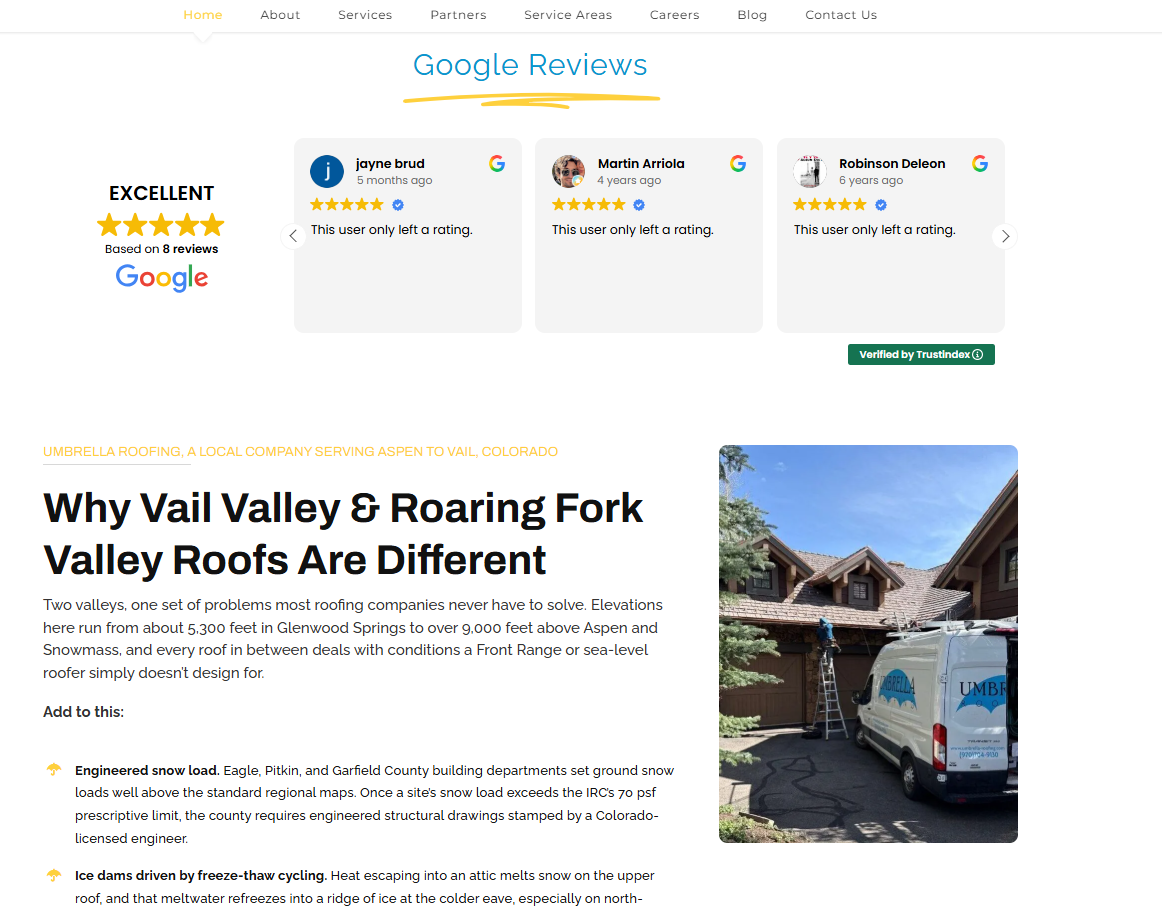
This is where reviews come in. On each new landing page, I used a WordPress plugin called TrustIndex.io, that displays their Google reviews at the top of the page. Every visitor sees their 4.8-star rating before reading anything else. Reviews earned on Google can keep winning customers on your own website too.
FAQs
Do Google reviews help SEO?
Yes. Google says review count and ratings feed “prominence,” one of its three local ranking factors. Local SEO experts surveyed by Whitespark rank rating, review count, and recency among the top local pack factors.
Can I offer a discount or gift card for reviews?
Not for Google reviews. Google prohibits any incentive, and violations can lead to blocked new reviews, unpublished reviews, and a public warning on your profile. The FTC rule is narrower and allows disclosed, sentiment-neutral incentives, but Google’s rule governs Google reviews.
How many Google reviews do I need?
There’s no set number. BrightLocal found 47% of consumers won’t use a business with fewer than 20 reviews. Benchmark against the businesses currently in your local 3-pack and aim for a steady monthly pace.
Can I ask only happy customers for reviews?
No. Google prohibits selectively asking for positive reviews, and the FTC says doing so could violate the FTC Act. Ask every customer.
Can family or employees leave reviews?
No. Google treats reviews from employees and family members as a conflict of interest and removes them. Don’t ask.
How do I remove a bad Google review?
You can only get a review removed if it breaks Google’s policies, such as spam, off-topic content, fake reviews, or a conflict of interest. Report it, track it in the Reviews Management Tool, and use the one-time appeal if needed. For genuine negative reviews, reply professionally instead.
What if someone demands money to remove fake reviews?
Don’t pay or engage. Collect screenshots of the reviews and messages, and report it through Google’s merchant extortion form.
Should I respond to every review?
Yes. BrightLocal found 80% of consumers are likely to use a business that responds to all of its reviews, compared with 45% to 47% for one that replies selectively.
Want to Know How Your Reviews Stack Up Against the 3-Pack?
Most business owners have a rough guess at how their reviews compare to the competition, and a rough guess is expensive when it’s wrong. My Free Google Business Profile & Map Ranking Audit shows you where your profile stands today, including your review count, rating, and recency compared with the businesses currently holding the 3-pack in your town. No pitch, no pressure, no guesswork, just a real read on where you stand and what to fix first.
Sources & Citations
1. Google Business Profile Help, “Tips to improve your local ranking on Google”
https://support.google.com/business/answer/7091?hl=en
Google’s own explanation of relevance, distance, and prominence, including the role of review count and ratings.
Supports: “What Google itself says” and FAQ 1.
2. Whitespark, “Official 2026 Local Search Ranking Factors”
https://whitespark.ca/local-search-ranking-factors/
Survey of 47 local SEO experts scoring 187 factors, published November 6, 2025. Expert consensus, not Google data.
Supports: Factor rankings, Darren Shaw quote, and the 5 to 10 reviews recommendation.
3. BrightLocal, “Local Consumer Review Survey 2026”
https://www.brightlocal.com/research/local-consumer-review-survey/
Survey of 1,002 U.S. adults, published February 11, 2026.
Supports: All 2026 consumer behavior, reply, recency, and asking statistics.
4. BrightLocal, “Impact of Reviews and Ratings on Search Click-Through”
https://www.brightlocal.com/research/review-search-click-through-study/
2016 click test with 6,283 panelists using mock search pages.
Supports: “What a star rating does to clicks.”
5. Birdeye, “State of Google Business Profile 2026”
https://birdeye.com/blog/state-of-google-business-profiles/
Vendor data from large multi-location brands, published April 29, 2026. Birdeye notes results are not guaranteed.
Supports: Per-review impression, visit, direction, and call averages.
6. Google Business Profile Help, “Prohibited & restricted content”
https://support.google.com/business/answer/7400114?hl=en
Google’s Fake Engagement and Rating Manipulation policies.
Supports: The Do / Don’t policy table, review gating, incentives, and the velocity policy note.
7. Google Business Profile Help, “Tips to get more reviews”
https://support.google.com/business/answer/3474122?hl=en
Google’s guidance on requesting reviews.
Supports: “How to Ask for Google Reviews.”
8. Google Business Profile Help, “Create a Google link or QR code to request reviews”
https://support.google.com/business/answer/16816815?hl=en
Steps to get a review link and QR code, plus suggested placements.
Supports: “How to get your Google review link and QR code.”
9. Google Business Profile Help, “Business Profile restrictions for policy violations”
https://support.google.com/business/answer/14114287?hl=en
Google’s documented penalties for review policy violations.
Supports: “What happens if Google catches a violation” and FAQ 2.
10. Google, The Keyword, “New ways we’re protecting businesses on Maps”
https://blog.google/products-and-platforms/products/maps/new-ways-were-protecting-businesses-on-maps/
Google’s April 16, 2026 announcement on enforcement totals and spam-spike protections.
Supports: Enforcement scale and extortion protections.
11. Google Maps Content Trust & Safety Report, “Fighting fake reviews”
https://transparencyreport.google.com/maps-content/protections?lu=fighting-fake-reviews&hl=en
Google’s transparency data on reviews removed for fake engagement.
Supports: The 221 million figure.
12. FTC, “Federal Trade Commission Announces Final Rule Banning Fake Reviews and Testimonials”
https://www.ftc.gov/news-events/news/press-releases/2024/08/federal-trade-commission-announces-final-rule-banning-fake-reviews-testimonials
FTC press release on the final rule, August 2024.
Supports: “The federal layer: the FTC.”
13. FTC, “The Consumer Reviews and Testimonials Rule: Questions and Answers”
https://www.ftc.gov/business-guidance/resources/consumer-reviews-testimonials-rule-questions-answers
FTC business guidance on incentives, review gating, and review suppression.
Supports: FTC nuance on incentives and gating, template wording, and the legal guardrail.
14. Google Business Profile Help, “Read & reply to reviews”
https://support.google.com/business/answer/3474050?hl=en
How owner replies work, including timing and reviewer notifications.
Supports: “How replies work on Google.”
15. Google Business Profile Help, “Report inappropriate reviews on your Business Profile”
https://support.google.com/business/answer/4596773?hl=en
What Google removes, how to report, and the appeal process.
Supports: “Fake, Unfair, or Extortion Reviews” and FAQ 6.
16. Google Business Profile Help, “Report negative review extortion scams on your Business Profile”
https://support.google.com/business/answer/16404809?hl=en
Google’s guidance on review extortion.
Supports: “Review extortion scams” and FAQ 7.
17. HHS Office for Civil Rights, settlement with New Vision Dental ($23,000)
https://www.hhs.gov/hipaa/for-professionals/compliance-enforcement/agreements/new-vision/index.html
Enforcement action over patient information disclosed in review replies.
Supports: Health and wellness provider callout.
18. HHS Office for Civil Rights, settlement with Manasa Health Center ($30,000)
https://www.hhs.gov/hipaa/for-professionals/compliance-enforcement/agreements/manasa/index.html
Enforcement action over patient information disclosed in a reply to a negative review.
Supports: Health and wellness provider callout.
19. HHS, “Covered Entities and Business Associates”
https://www.hhs.gov/hipaa/for-professionals/covered-entities/index.html
Defines which providers HIPAA applies to.
Supports: Health and wellness provider callout.
20. Yelp for Business, “Don’t Ask for Reviews”
https://biz.yelp.com/support-center/Reviews/Best_Practices/Don-t-Ask-for-Reviews/en-US
Yelp’s policy on soliciting reviews.
Supports: “A quick note on Yelp.”
21. Resparo, “Google’s AI Review Reply Feature: What It Actually Does”
https://resparo.io/blog/google-ai-review-reply-feature
Secondary source describing Google’s AI reply draft feature as a limited test.
Supports: “Should you use AI to write replies?”
22. SearchEye, “Birdeye Alternatives in 2026”
https://searcheye.io/blog/best-birdeye-alternatives
Vendor comparison roundup, used only to confirm current tool names.
Supports: “Tools That Automate Review Requests.”
Discover more from The Athena Arena with Liz Gracia
Subscribe to get the latest posts sent to your email.

Leave a Reply