
Quick Answer: A Google Business Profile (GBP) is the free listing Google uses to show your business on Maps, in the map 3-pack, and in the Knowledge Panel. It’s the foundation nearly every other local SEO tactic builds on, but it has one real limit: it can only compete for map-pack visibility near your physical address…most of the time and I have seen exceptions.
What’s covered in this post:
- What a Google Business Profile actually is, and where it shows up
- Why it’s the foundation local SEO builds on, not an optional extra
- What’s inside a complete profile
- How to check if you already have one, and how to claim and verify it
- One honest limit to understand before you invest more time in it
You searched a local business on your phone, and before you ever saw its website, you were looking at its Google Maps listing. Photos, hours, reviews, a phone number, maybe a “Get Directions” button waiting for a tap. That’s a Google Business Profile, and it happened to you before you finished reading this sentence.
If you’ve read [LINK: pillar post — “the local SEO playbook”], you already know the map 3-pack, the three businesses that show up with the map at the top of a local search, is where most of the click-through action happens. Your Google Business Profile is what gets you a shot at one of those three spots. Not a website plugin. Not an ad. The free listing itself.
This post covers what a GBP actually is, what’s inside one, how to find out if you already have one sitting unclaimed, and one honest limit every small business owner needs to understand before pouring more time into optimizing it.
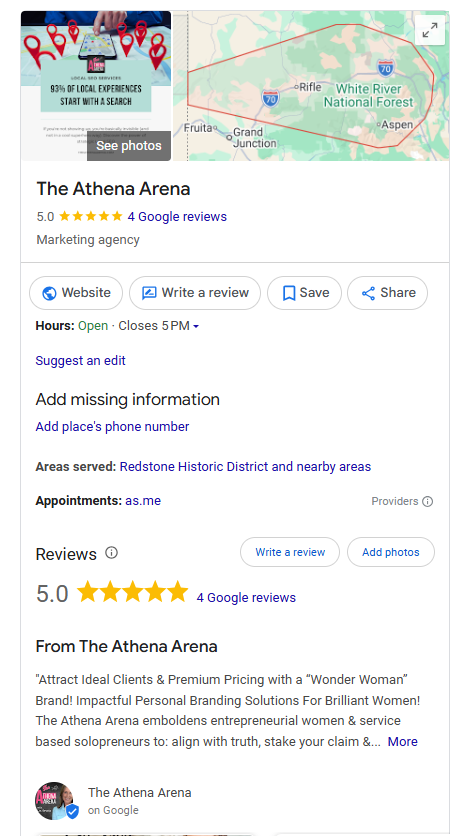
Google Business Profile for The Athena Arena
What Is a GBP, Exactly?
A Google Business Profile is a free business listing that Google manages and displays across Search and Maps. It’s not a website. It’s not a directory listing you pay to maintain. It’s Google’s own record of your business, name, address, phone number, hours, category, photos, reviews, and posts, pulled together into one panel that shows up in three places.
On Google Maps,
when someone searches for a business type or a specific business name.
In the map 3-pack,
the three-listing block with a map that appears at the top of local search results, above the standard blue links.
In the Knowledge Panel,
the info box that appears on a search results page when someone searches your exact business name.
A website tells your story. A Google Business Profile tells Google, and the person searching, the facts fast: are you open right now, how far away are you, and what do other people say about you. Both matter. Only one of them can put you in the map pack.

Why It’s the Foundation of Local SEO
If you’re only going to do one thing for your local search visibility this month, it’s this: build out a complete Google Business Profile for small business use, correctly, before anything else. Nearly every other tactic in local SEO, keyword research, review generation, citation cleanup, exists to support a GBP that’s already claimed and complete. Skip this step and the rest of your local SEO strategy has nothing to stand on.
Think of it as the foundation of a house. You can pick the nicest paint color, that’s your reviews, the best landscaping, that’s your citations, the most photogenic curb appeal, that’s your content. None of it holds up if the foundation underneath is half-poured. A claimed, verified, fully built-out profile is step one. Not a nice-to-have you’ll circle back to later.
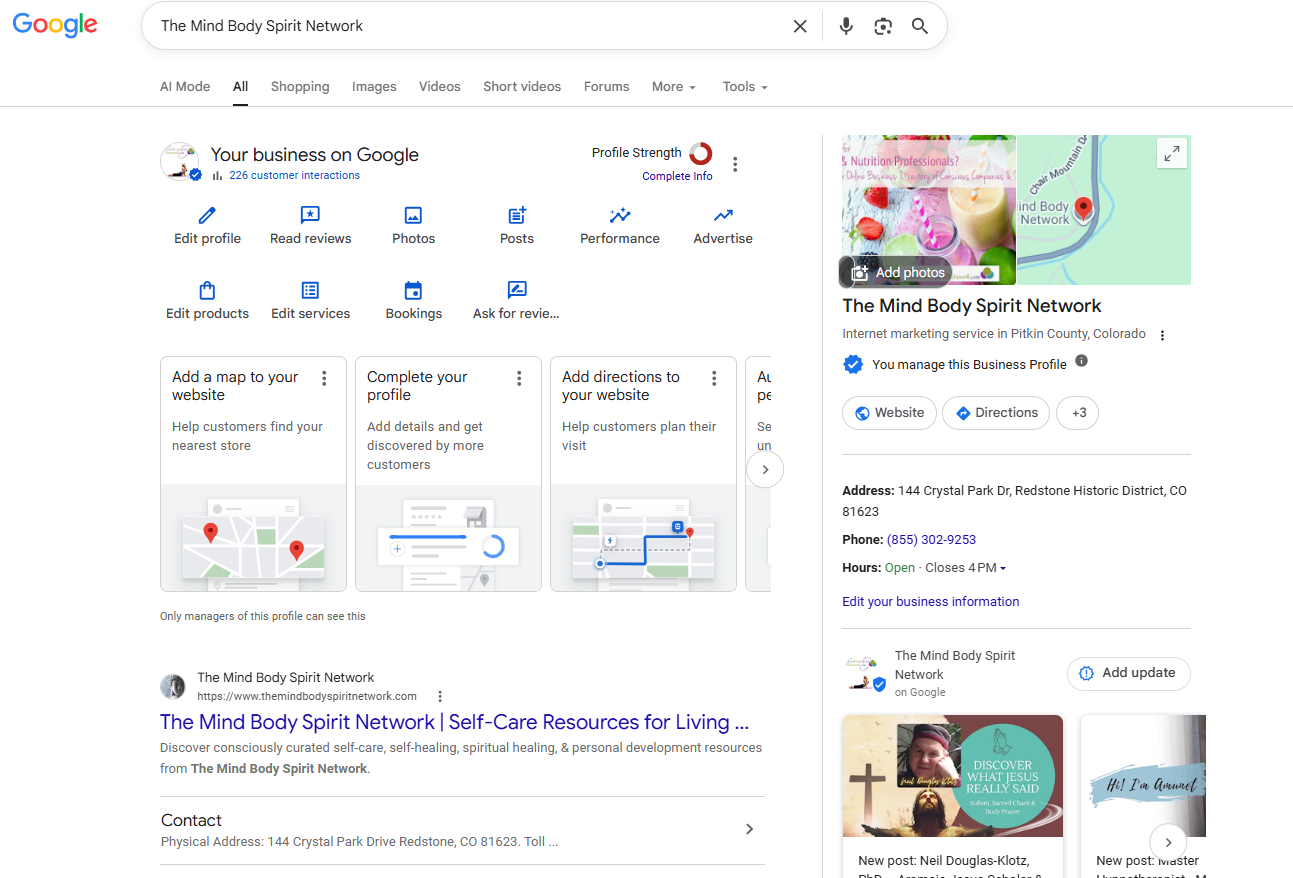
Google Business Profile Dashboard for The Mind Body Spirit Network (My other website)
What’s Inside a GBP
Every Google Business Profile is made up of the same handful of core building blocks. Get these right and you’ve done the majority of the heavy lifting.
Business Info.
Your name, address, phone number, hours, category, and attributes. This sounds basic, and it is, but it’s also the data Google leans on most heavily for both ranking and searcher trust. Your primary category alone can be the difference between showing up for the searches that matter and being invisible for them. Get this wrong and everything downstream suffers.
Photos & Videos.
Profiles with real, current photos read as more trustworthy, both to Google and to the person doing the searching. Google’s own guidance is straightforward here: an empty profile with a generic gray storefront icon reads as unmanaged, while real interior shots, your team, your storefront, your work in action, help customers recognize your business and take it seriously before they’ve ever walked in.
Reviews & Q&A.
Reviews are both a ranking signal and the reason someone picks you over the next name in the map pack. This deserves its own post [Coming soon: “Get more 5-star reviews”], but at minimum, know that review volume and rating feed directly into what Google calls “prominence,” one of its three core local ranking factors.
Posts & Products.
The features most small businesses skip entirely, and the ones that keep a profile looking active instead of abandoned. Posts let you share updates, offers, or events directly in your listing. Products or services let you showcase what you actually sell before someone even clicks through to your site.
Do You Already Have One? (Claim & Verify)
Here’s something that surprises a lot of business owners: Google often creates a Business Profile automatically, pulled from public records, even if you never set one up yourself. Before you assume you’re starting from zero, check.
Step 1: Search for your business.
Type your exact business name and city into Google. If a Maps listing or Knowledge Panel already shows up, someone, possibly Google itself, already created a profile.
Step 2: Claim it.
If a listing exists but isn’t managed by you yet, go to google.com/business and search for your business to claim it.
Step 3: Verify it.
Google needs to confirm you’re the real owner before you get full control. Depending on your business type and location, Google assigns you one of a few verification methods automatically: phone or text, email, a live video call showing your location, or a postcard mailed to your business address. Google states that verification review typically takes up to five business days once you’ve completed the steps, and a mailed postcard usually arrives within about 14 days if that’s the method you’re assigned.
You don’t get to pick your verification method. Google decides based on your business type and what information is already public. If a postcard is the option you’re given, plan for the wait and don’t leave your profile half-finished while it’s in transit.
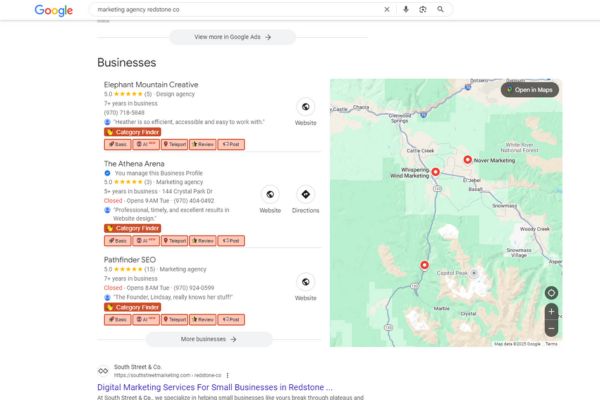
This is What a Google Business Profile Map 3-Pack Looks Like
One Important Limit: Your GBP Only Covers Nearby Searches
Here’s the part most local SEO advice glosses over. Google’s own guidance names three ranking factors for local results: relevance, distance*, and prominence. Distance means literally that, how far the business is from the person doing the searching. It’s not a minor factor. It’s one of three pillars the entire system is built on.
That has a real consequence. A perfectly optimized Google Business Profile can only compete for the map pack in towns reasonably near* its physical address. If your ideal clients live somewhere your profile’s radius doesn’t comfortably reach, or your niche is too competitive to crack the top three no matter what you do, profile optimization alone will not get you there. That’s not a failure on your part. It’s how the system is built.
The fix isn’t giving up on those towns. It’s a separate, content-driven strategy: dedicated, genuinely useful pages built for the specific communities you want to reach, ranking organically rather than relying on the map pack’s proximity bias. [Coming soon: “Service Area Business SEO: How to Rank on Page 1 Without the Map Pack”] walks through the full approach.
*I have exceptions to this rule. They depend on a few factors that are beyond the scope of this post.
Common Mistakes
Three mistakes account for most of the wasted potential I see in Google Business Profiles.
Leaving fields incomplete or picking the wrong primary category.
An unfinished profile or a mismatched category actively works against you in a ranking system built on relevance.
Duplicate or unmanaged profiles.
Multiple listings for the same business confuse both Google and searchers, and they split whatever authority you’re building instead of consolidating it.
Ignoring the profile after initial setup.
A GBP isn’t set it and forget it. Profiles that go stale, no new photos, no posts, no review responses, read as abandoned, and Google’s ranking system notices inactivity just as much as searchers do. I have first hand evidence of this problem. When I stopped regular posting and TLC with my GBP, I fell off the map 3-pack!
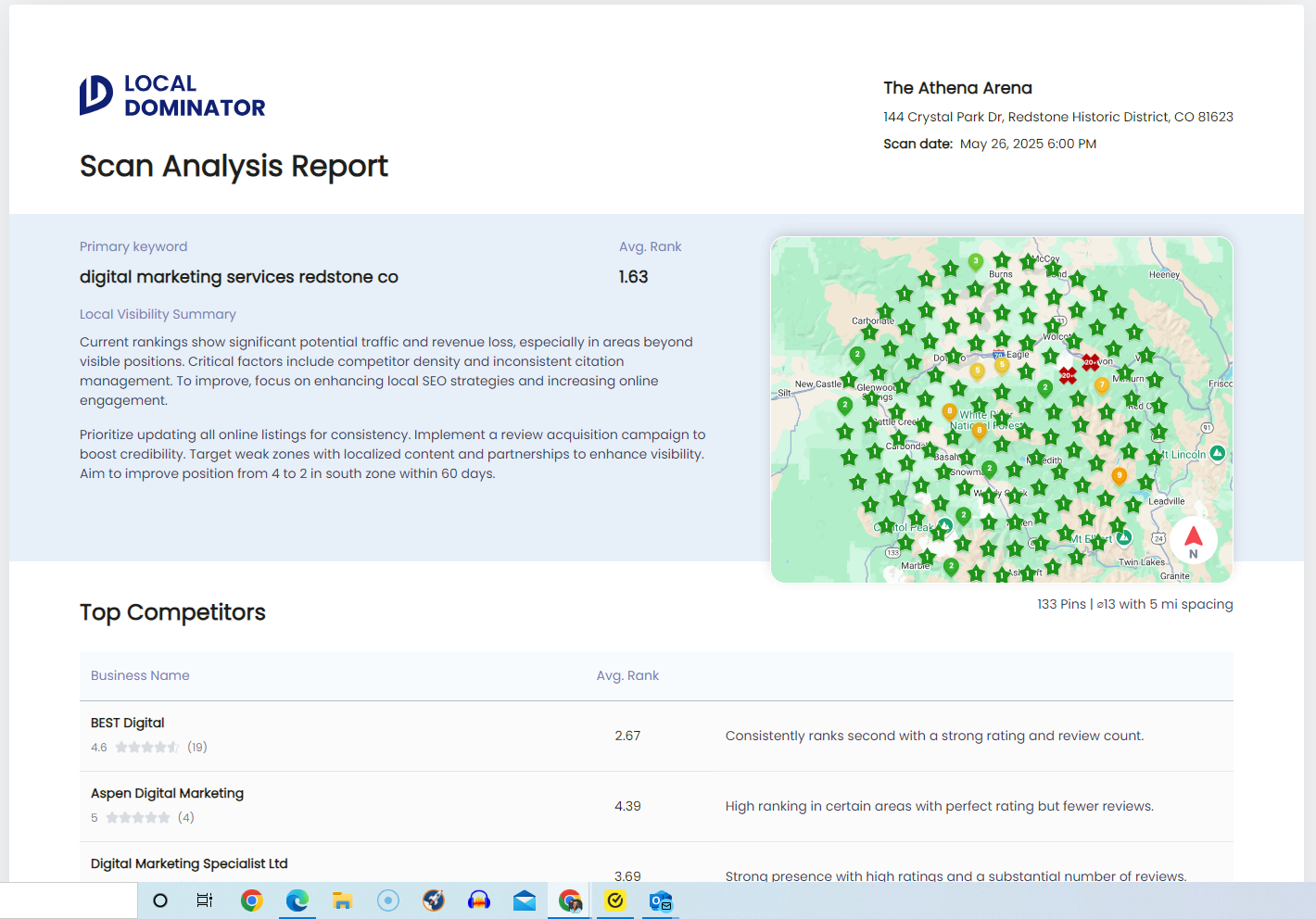
All RED Means I Fell Off the Map!

All GREEN I’m Lovin’ on My GBP
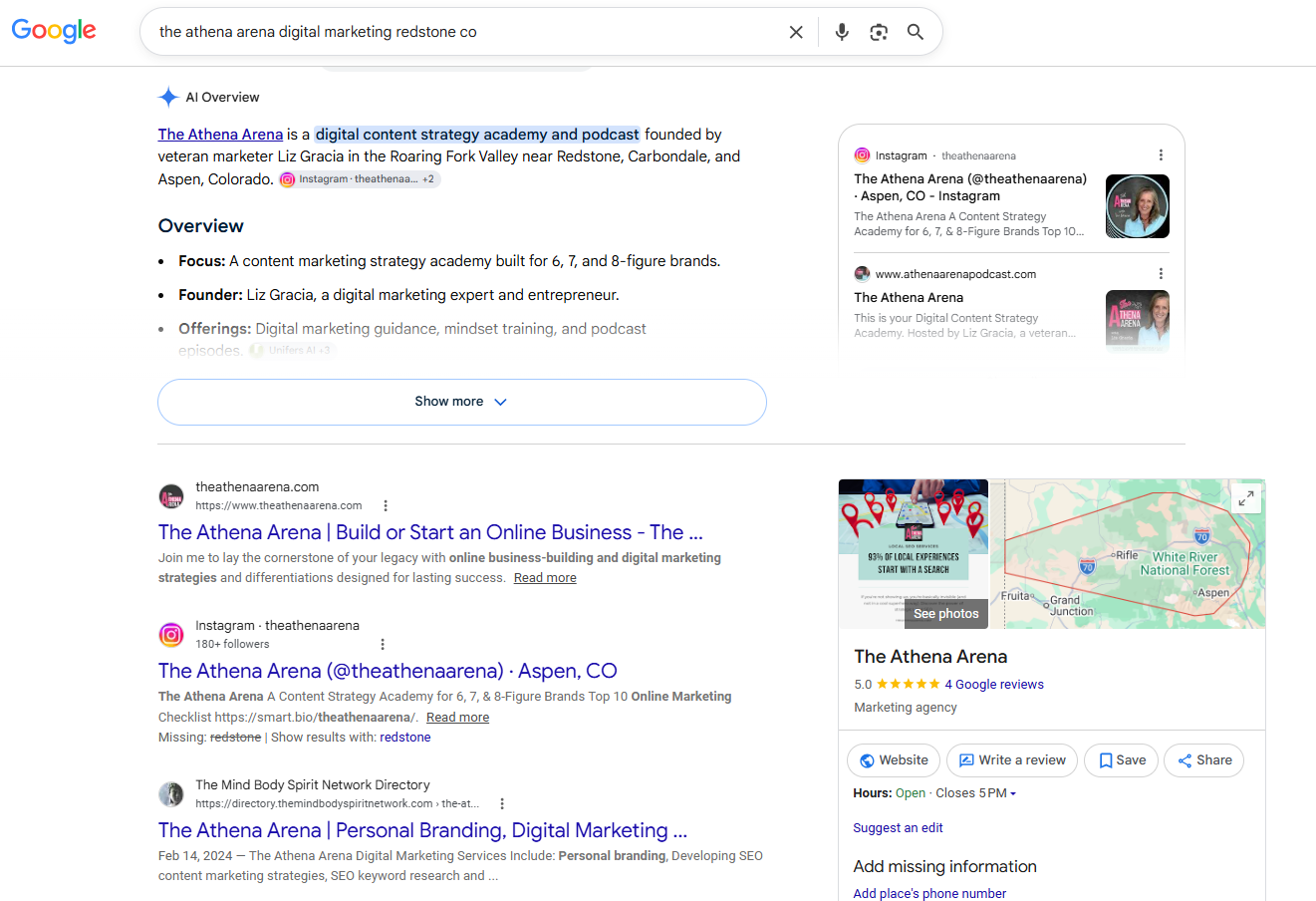
Screenshot of What Local GBP Results Look Like Including AI Overviews
FAQs
Do I need a Google Business Profile if I already have a website?
Yes. They do different jobs. Your website is where you tell your full story and convert visitors. Your Google Business Profile is what gets you into Maps, the map 3-pack, and the Knowledge Panel, places your website alone can’t reach. You need both, and they should work together, not compete.
Is a Google Business Profile free?
Yes, creating and managing a Google Business Profile costs nothing. Google doesn’t charge for the listing itself, and its own guidance is explicit that there’s no way to pay for a better local ranking. What you invest is time: filling it out completely, keeping it current, and building the reviews and content that support it.
How long does it take Google to verify a new profile?
It depends on the verification method Google assigns you, which you don’t get to choose. Phone, text, or email verification can happen almost immediately. A live video call depends on scheduling. A mailed postcard typically takes around 14 days to arrive, and Google states verification review itself can take up to five business days once you’ve submitted your code.
My Google Business Profile isn’t located in the city I want to rank in. What can I do?
You won’t win that city’s map pack from a physical address elsewhere (though I have seen otherwise…), because distance is one of Google’s core local ranking factors. But that’s not a dead end. Organic, town-specific content built for that exact community is a real path to page-one visibility, even without a local address. [Coming soon: “Service Area Business SEO”] breaks down the full approach. This has been my approach for organic local search rankings.
Screenshot of Real Local SEO search results and example of what you’ll recive
Not Sure Where You Actually Stand Right Now?
A Google Business Profile is the foundation, but foundations can be built wrong without anyone noticing until you look closely. If you want an honest read on where your business currently shows up, and where it’s quietly losing ground to a competitor with a more complete profile, that’s exactly what a Free Visibility Audit is for. No pitch, no pressure, just a real look at your actual profile and what fixing it would take.
Sources & Citations
This post draws directly on Google’s own current documentation for Business Profiles, current as of publishing.
1. Google Business Profile Help — Improve your local ranking on Google
https://support.google.com/business/answer/7091?hl=en
Google’s official explanation of the three local ranking factors, relevance, distance, and prominence, and its statement that local ranking can’t be bought.
Supports: the geographic-limit section on distance, and the FAQ answer confirming ranking can’t be purchased.
2. Google Business Profile Help — Verify your business on Google
https://support.google.com/business/answer/7107242?hl=en
Google’s official guidance on verification methods (phone, text, email, video call, postcard) and stated timelines.
Supports: the Claim & Verify section and the verification-timing FAQ.
3. Google Business Profile Help — Add photos and videos on Google
https://support.google.com/business/answer/6103862?hl=en
Google’s official guidance on why photos help customers recognize and trust a business listing.
Supports: the Photos & Videos subsection.
Discover more from The Athena Arena with Liz Gracia
Subscribe to get the latest posts sent to your email.

[…] at all, or who’ve been putting money into Google Ads every month without ever touching their Google Business Profile. Ads and a strong profile aren’t really competing strategies, they’re honestly six of […]
[…] Google Business Profile is registered in Palmdale, California. Palmdale sits in the Antelope Valley in the far northern […]
[…] no way to request or pay for a better local ranking on Google.” Reviews live on your Google Business Profile, and they’re one of the few prominence signals you can actively build, week after […]